How would you like to connect to the mail server?
We strongly recommend IMAP, so all devices are in sync.
Thunderbird: IMAP (Existing Profile)
This article will assist you with setting up a mailbox in an existing Thunderbird profile already containing a mailbox.
- Open Thunderbird.
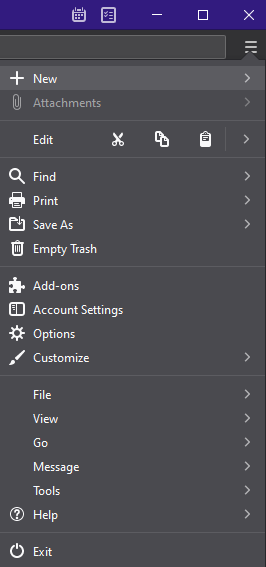
- When Thunderbird opens, select the hamburger menu in the top right and then New.
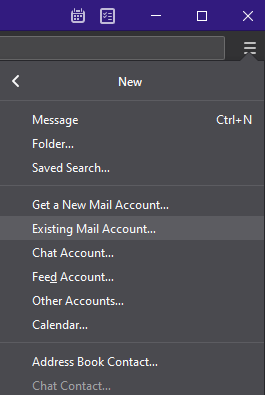
- After that, select Existing Mail Account...
-
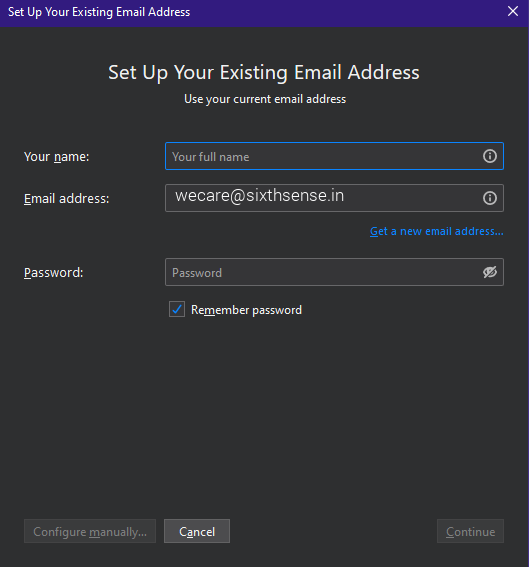
In the Set Up Your Existing Email Address window, input the following information before hitting Configure manually
Your name: your name
Email Address: wecare@sixthsense.in
Password: Your mailbox password
-
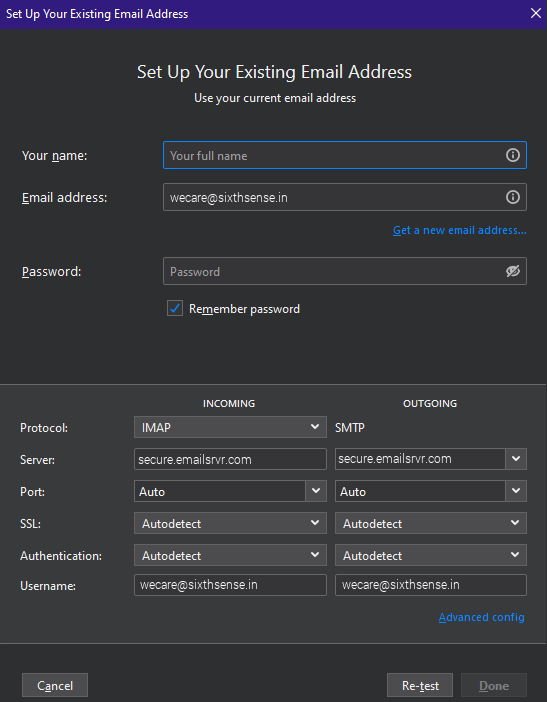
After hitting Configure manually enter these fields before selecting Done:
Username: wecare@sixthsense.in
Protocol: IMAP
Incoming Server: secure.emailsrvr.com
Incoming Port: 993
Outgoing Server: secure.emailsrvr.com
Outgoing Port: 465 or 587
Authentication: Normal Password
- Congratulations! You have now set up Thunderbird to work with your Mailbox. Please wait 15 minutes before troubleshooting to allow for mail to download.
Thunderbird: POP (Existing Profile)
This article will assist you with setting up a mailbox in an existing Thunderbird profile already containing a mailbox.
- Open Thunderbird.
- When Thunderbird opens, select the hamburger menu in the top right and then New.
- After that, select Existing Mail Account...
-
In the Set Up Your Existing Email Address window, input the following information before hitting Configure manually
Your name: your name
Email Address: wecare@sixthsense.in
Password: Your mailbox password
-
After hitting Configure manually enter these fields before selecting Done:
Username: wecare@sixthsense.in
Protocol: POP3
Incoming Server: secure.emailsrvr.com
Incoming Port: 995
Outgoing Server: secure.emailsrvr.com
Outgoing Port: 465 or 587
Authentication: Normal Password
- Congratulations! You have now set up Thunderbird to work with your Mailbox. Please wait 15 minutes before troubleshooting to allow for mail to download.